
CLI ToDo Manager
Modern CLI task manager with priorities, deadlines and desktop notifications
Powerful command-line task management application with support for priorities, deadlines, system notifications, and a beautiful colorful interface.
cli-todo-manager - a powerful command-line task management application with support for priorities, deadlines, system notifications, and a beautiful colorful interface.
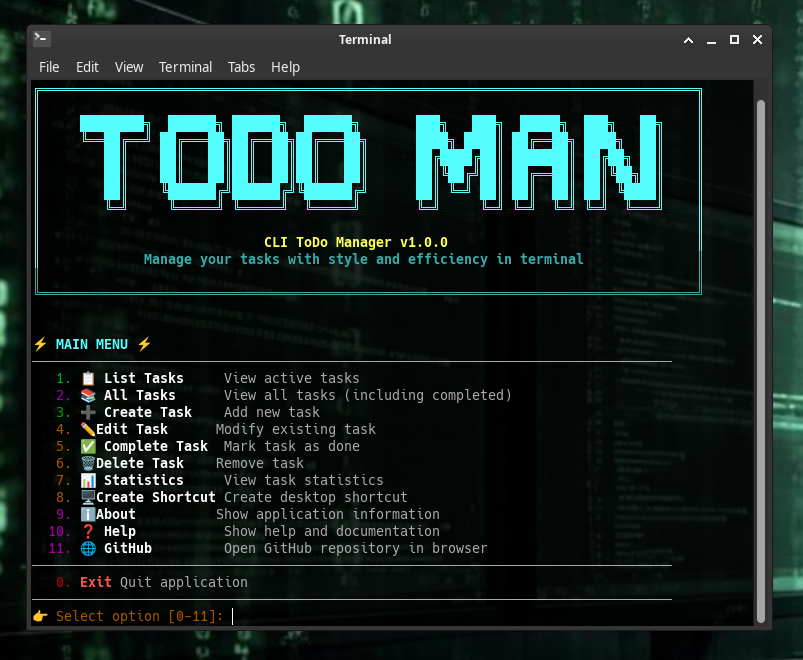
- 🎯 Task Priorities - Low, Medium, Critical with color indicators
- 📅 Deadlines - Smart color coding (white/yellow/red)
- 🔔 System Notifications - With sound and app icon
- 📊 Statistics - Task analytics by priority and status
- 🎨 Beautiful UI - Color output, ASCII art logo, emojis
- 🖥️ Desktop Shortcut - Create launcher on your desktop
- 💾 Local Storage - SQLite database
- 🚀 High Performance - Database indexes, optimized queries
System Requirements:
- Python 3.8+
- Linux (for full notification functionality)
- libnotify-bin (for desktop notifications)
Installation:
# Clone the repository
git clone https://github.com/aixandrolab/cli-todo-manager.git
cd cli-todo-manager

# Install dependencies on Ubuntu/Debian
sudo apt install python3 libnotify-bin sound-theme-freedesktop

# Run the application
python app.py
Main Menu:
⚡ MAIN MENU ⚡
────────────────────────────────────────────────────────
   1. 📋 List Tasks       - View active tasks
   2. 📚 All Tasks        - View all tasks (including completed)
   3. ➕ Create Task      - Add new task
   4. ✏️ Edit Task        - Modify existing task
   5. ✅ Complete Task    - Mark task as done
   6. 🗑️ Delete Task      - Remove task
   7. 📊 Statistics       - View task statistics
   8. 🖥️ Create Shortcut  - Create desktop shortcut
   9. ℹ️ About            - Show application information
  10. ❓ Help             - Show help and documentation
  11. 🌐 GitHub           - Open GitHub repository
────────────────────────────────────────────────────────
   0. 🚪 Exit             - Quit application
Creating a Task:
📝 Task name (can include emojis): Complete project 🚀
📄 Description (optional): Finish CLI ToDo Manager

🎯 Select priority:
  1. 🟢 Low
  2. 🟡 Medium
  3. 🔴 Critical
Choice: 3

⏰ Add deadline? (y/n): y
📅 Deadline (YYYY-MM-DD HH:MM): 2026-04-30 10:00
| Color | Meaning |
|---|---|
| 🟢 Green | Low priority / Completed |
| 🟡 Yellow | Medium priority / Deadline soon |
| 🔴 Red | Critical priority / Overdue |
| 🔵 Cyan | Information / Headers |
| ⚪ White | Normal deadline (>1 day left) |
| 🟡 Yellow | Deadline ≤ 1 day |
| 🔴 Red | Overdue deadline |
The application automatically monitors deadlines and sends system notifications:
- Overdue Tasks - Every 30 minutes (critical priority)
- Deadline Today - On the due date (critical priority)
- Deadline Tomorrow - 1 day before (warning priority)
- Deadline in 2 Days - Reminder (normal priority)
Notifications are grouped by type to prevent sound spam when multiple tasks are due.
cli-todo-manager/
├── core/
│   ├── database/         # Database operations
│   │   └── db_manager.py
│   ├── models/           # Data models
│   │   └── todo.py
│   ├── ui/               # User interface
│   │   ├── ascii_art.py
│   │   ├── colors.py
│   │   └── menu.py
│   └── utils/            # Utilities
│       ├── config.py
│       ├── desktop_entry.py
│       └── notifications.py
├── data/
│   └── icons/            # Application icons
│       └── icon.png
├── app.py               # Entry point
└── README.md             # Documentation
Adding an Icon:
Place your icon.png file in the data/icons/ directory for use in desktop shortcuts, system notifications, and application menu.
Extending Functionality:
Main classes for extension:
Todo- Task model (core/models/todo.py)DatabaseManager- Database operations (core/database/db_manager.py)Menu- UI and logic (core/ui/menu.py)NotificationManager- Notifications (core/utils/notifications.py)
By using this software, you agree to the full disclaimer terms.
Software provided "AS IS" without warranty. You assume all risks.
Full legal disclaimer: See DISCLAIMER.md
License: BSD 3-Clause License