
Smart 2FA Manager TUI
Offline, independent TOTP 2FA manager with a full-screen terminal interface
GPG-encrypted storage, real-time codes, full CRUD. No cloud, no phone required.
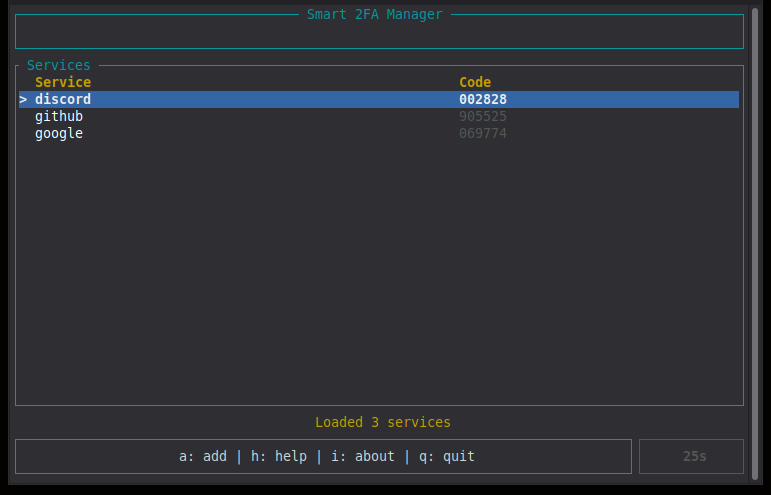
smart-2fa-manager-tui-rs is a self-contained terminal application for managing TOTP 2FA codes. It stores your secrets locally in a GPG-encrypted file and generates codes in real time, with no cloud, no phone and no third-party trust required.
The application keeps only your service names and their base32 secrets, encrypted with AES-256 via GPG. Codes are recalculated whenever you need them, using standard RFC 6238 TOTP.
Decentralized by design: no cloud, no database, no third-party trust required. Your secrets never leave your device.
Core Principles
- Offline by Design - no network access at runtime, codes generated locally
- Encrypted Storage - secrets stored in
~/.2fa/secrets.gpg(AES-256) - Real-Time Codes - TOTP codes refresh every 30 seconds with a countdown
- Ecosystem Compatible - same storage format as bash, Python CLI, PyQt and Android versions
- Full CRUD - add, edit, delete services with confirmation
- System Clipboard - copy codes via
arboardon X11, Wayland, Windows and macOS
What you can do
- Add services - register a service name and its base32 TOTP secret
- View codes - select a service and see the current 6-digit code
- Copy codes - send the code to the system clipboard with one key press
- Edit services - change the service name or secret at any time
- Delete services - remove entries with a confirmation step
- Change master password - re-encrypt the storage without touching the secrets
Key Features
- Full-Screen TUI - built with
ratatuiandcrossterm - GPG-Encrypted Storage - AES-256, compatible with the Python, bash and Android versions
- Real-Time TOTP Codes - refresh themselves every 30 seconds
- Countdown Timer - color changes as the code approaches expiry
- Full CRUD - add, edit, delete services with confirmation
- Master Password Change - re-encrypt without touching the secret data
- Copy to Clipboard - system clipboard on X11, Wayland, Windows, macOS
- Help and About Screens - all key bindings documented in-app
- No Network Access - runs entirely offline, no runtime dependencies
List screen
| Key | Action |
|---|---|
j / Down | Move selection down |
k / Up | Move selection up |
Enter / g | Show code for selected service |
c | Copy current code to system clipboard |
a | Add a new service |
e | Edit selected service |
d | Delete selected service |
p | Change master password |
h / ? | Help |
i | About |
q / Esc | Quit |
Ctrl+C | Quit immediately |
Form screen (add / edit)
| Key | Action |
|---|---|
Tab / Down | Next field |
Shift+Tab / Up | Previous field |
Enter | Save |
Esc | Cancel |
Change password screen
| Key | Action |
|---|---|
Tab / Down | Next field |
Shift+Tab / Up | Previous field |
Enter | Apply |
Esc | Cancel |
Confirm delete screen
| Key | Action |
|---|---|
y | Delete |
n / Esc | Cancel |
Message screen
| Key | Action |
|---|---|
c | Copy code to system clipboard |
Enter / Esc / Space | Close message |
Copy behavior
When you press c, the application sends the code to the system clipboard via the arboard crate. This works on X11, Wayland (via wayland-data-control), Windows and macOS, without relying on terminal escape sequences.
- First launch - the app asks you to create a master password. This password encrypts
~/.2fa/secrets.gpg. - Add a service - press
a, enter a service name and its base32 TOTP secret, then pressEnter. - View a code - select the service with
j/k, pressEnterorg. - Copy a code - press
cto copy the current code to the system clipboard. - Edit / delete - press
eto edit,dto delete (requires confirmation). - Change master password - press
p, enter the current and new passwords. - Help - press
hfor the full key binding reference.
If ~/.2fa/secrets.gpg already exists (from the Python, bash or Android version), the app opens directly to the unlock screen and reads the existing storage without conversion.
Secrets are stored in a single file encrypted with GPG (AES-256):
~/.2fa/
└── secrets.gpg
Format before encryption:
service_name:base32secret
another_service:base32secret
Compatible with:
- smart-2fa-manager-bash
- smart-2fa-manager-cli (Python CLI)
- smart-2fa-manager-desktop (PyQt)
- smart-2fa-manager-android
You can switch between these applications without any conversion - just enter the same master password.
- Your master password is never stored on disk.
- GPG is called with
--passphrasefor compatibility with existing backups. For higher isolation, pass the password via--passphrase-fdif you modify the source. - Lock your terminal when leaving the computer. The TUI keeps decrypted secrets in memory only while the app is running.
- Backups of
~/.2fa/secrets.gpgare encrypted with the same master password - keep them in a safe place. - On Wayland sessions, the clipboard works via
wayland-data-control. On X11, the standard X11 clipboard is used. Thearboardcrate handles both automatically.
Dependencies
gpg(GNU Privacy Guard) - required for encryption- Rust 1.88+ and Cargo - only for building from source
# Arch Linux
sudo pacman -S gnupg

# Debian / Ubuntu
sudo apt install gpg

# Fedora / RHEL
sudo dnf install gnupg2
Option 1: Prebuilt binary
Download the musl binary from the Releases page, then:
chmod +x smart-2fa-manager-tui-<version>-linux-x86_64-musl
./smart-2fa-manager-tui-<version>-linux-x86_64-musl
The musl build is statically linked and runs on any modern Linux distribution.
Option 2: Build from source
git clone https://github.com/smartlegionlab/smart-2fa-manager-tui-rs.git
cd smart-2fa-manager-tui-rs
cargo build --release && \
install -Dm755 target/release/smart-2fa-manager-tui "$HOME/.local/bin/smart-2fa-manager-tui"
Make sure ~/.local/bin is in your PATH.
Option 3: One-command install
curl -fsSL https://raw.githubusercontent.com/smartlegionlab/smart-2fa-manager-tui-rs/master/install.sh | bash
Installs the binary to ~/.local/bin/ and registers the application in your desktop menu.
Option 4: Cargo
cargo install smart-2fa-manager-tui
Uninstall
rm -f ~/.local/bin/smart-2fa-manager-tui
rm -f ~/.local/share/applications/smart-2fa-manager-tui.desktop
Your encrypted secrets in ~/.2fa/ are never touched by the uninstaller.
smart-2fa-manager-tui-rs/
├── Cargo.toml
├── README.md
├── LICENSE
├── install.sh
├── uninstall.sh
└── src/
    ├── main.rs
    ├── app.rs
    ├── ui.rs
    └── screen/
        ├── mod.rs
        ├── unlock.rs
        ├── list.rs
        ├── form.rs
        ├── confirm.rs
        ├── message.rs
        ├── help.rs
        ├── about.rs
        └── password.rs
Part of the Smart 2FA Management Ecosystem:
- smart-2fa-manager-bash - bash implementation
- smart-2fa-manager-cli - Python CLI
- smart-2fa-manager-desktop - PyQt desktop
- smart-2fa-manager-android - Android app
- smart-2fa-manager-tui-rs - this project (Rust TUI)
By using this software, you agree to the full disclaimer terms.
Software provided "AS IS" without warranty. You assume all risks.
Full legal disclaimer: See DISCLAIMER.md
License: BSD 3-Clause License