
Smart Password Manager GUI
A cross-platform desktop GUI for smart password management built on smartpasslib
Generate deterministic passwords from secret phrases without storing them. No cloud, no database, no trust required.
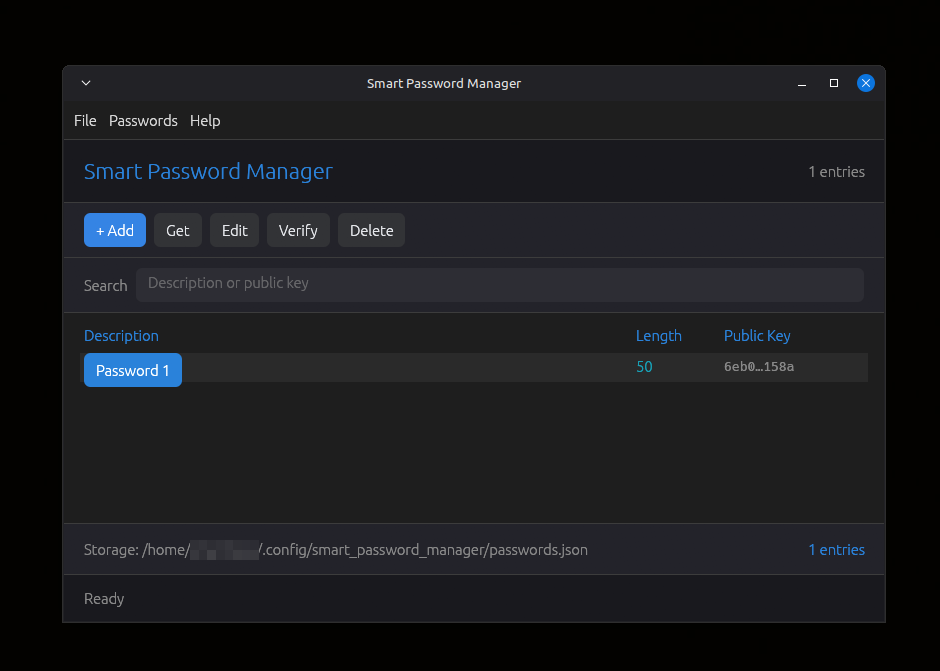
smart-password-manager-gui-rs is a self-contained desktop application for managing smart passwords - passwords that are regenerated on demand from a secret phrase instead of being stored. It is built on top of the smartpasslib library and uses the same cryptographic algorithm as the Python, JavaScript, Kotlin, Go and C# implementations.
The application stores only public verification keys, descriptions and lengths. Your secret phrase and the actual passwords are never written to disk. Passwords are recalculated whenever you need them, using the same deterministic algorithm.
Decentralized by design: no cloud, no database, no third-party trust required. Your secrets never leave your device.
Core Principles
- Zero-Storage Security - no passwords or secret phrases are ever stored or transmitted
- Decentralized Architecture - no central servers, no cloud dependency, no third-party trust
- Deterministic Regeneration - passwords are recreated identically from your secret phrase
- Metadata Only - only public keys, descriptions and lengths are stored
- Local Processing - all cryptographic operations happen on your device
- On-Demand Discovery - passwords exist only when you generate them
What you can do
- Add entries - register a service description and a secret phrase, choose a length, and store only the public verification key
- Get passwords - enter the secret phrase for an entry and regenerate the password on demand
- Verify secrets - prove knowledge of a secret phrase without exposing it or generating a password
- Edit metadata - change the description or the length at any time
- Delete entries - remove metadata when you no longer need it
- Copy to clipboard - one click copies a generated password to the system clipboard
- Search - filter entries by description or public key as you type
Key Features
- Decentralized & Serverless - no central database, no cloud lock-in, complete user sovereignty
- No Password Database - eliminates password storage completely
- Deterministic Password Generation - same secret + same length = same password, always
- Public Key Verification - verify secret knowledge without exposure
- Dark Theme Interface - clean, modern dark UI built with
egui - Full CRUD - create, read, update, delete entries from a desktop window
- Live Search - filter entries by description or public key in real time
- Secure Input - secret phrase hidden by default with Show / Hide toggle
- Live Validation - buttons enable only when the form is valid; counters for description and secret length
- Copy to Clipboard - system clipboard on X11, Wayland, Windows; OSC 52 fallback
- Keyboard Shortcuts - full keyboard navigation and hotkeys
- About / Help / Shortcuts Dialogs - built-in documentation and reference
- Cross-Platform Data - same
passwords.jsonformat as Python, JS, Kotlin, Go and C# - No Network Access - runs entirely offline, no runtime dependencies beyond the OS graphics stack
| Key | Action |
|---|---|
Ctrl+N | Add a new entry |
Ctrl+G | Get password for selected entry |
Ctrl+E | Edit selected entry (description, length) |
Ctrl+R | Verify secret against selected entry |
Del | Delete selected entry |
Enter | Get password for selected entry |
Up / k | Move selection up |
Down / j | Move selection down |
F5 | Refresh list from disk |
F1 | Open Help |
Ctrl+/ | Open keyboard shortcuts reference |
Ctrl+Q | Quit |
Esc | Close any open dialog |
Note: shortcuts are ignored while a text input has focus, so typing in the search box works normally.
When you click Copy to clipboard in the password dialog, or press Ctrl+C while the password is shown, the application tries two methods in order:
- System clipboard via the
arboardcrate. Works on X11, Wayland and Windows sessions. - OSC 52 escape sequence written to stdout. Works in most modern terminals and also over SSH.
If neither method is available, the status bar reports No clipboard available, and the password can be selected manually from the password field.
smart-password-manager --help
smart-password-manager --version
With no arguments the application opens its main window.
Creating Your First Entry
- Click + Add (or press
Ctrl+N) - Enter a service description (e.g.,
GitHub Account) - Enter your secret phrase (minimum 12 characters, never stored)
- Set password length (12–100 characters, 16–24 recommended)
- Click Create - only the public verification key is stored
Retrieving a Password
- Select an entry in the table (click a row, or use ↑ / ↓)
- Click Get or press
Ctrl+G/Enter - Enter your secret phrase
- The password regenerates - click Copy to clipboard to use it
Editing Metadata
- Select an entry and click Edit (or press
Ctrl+E) - Update the description or length
- Click Save
Deleting an Entry
- Select an entry and click Delete (or press
Del) - Confirm - only metadata is removed
Verifying a Secret
- Select an entry and click Verify (or press
Ctrl+R) - Enter your secret phrase
- The application reports whether the secret matches the stored public key - without generating or displaying the password
Searching
Type in the Search box at the top. Entries are filtered by description or public key as you type. Click Clear to reset.
Only public keys, descriptions and lengths are stored, as JSON. The file location follows the standard user data directory convention for your operating system.
| Platform | Path |
|---|---|
| Linux | ~/.config/smart_password_manager/passwords.json |
| Windows | %USERPROFILE%\.config\smart_password_manager\passwords.json |
Format:
{
  "a3f8c1e0b9d2f4a6c8e0b1d3f5a7c9e1b2d4f6a8c0e2b4d6f8a0c2e4b6d8f0a1": {
    "public_key": "a3f8c1e0b9d2f4a6c8e0b1d3f5a7c9e1b2d4f6a8c0e2b4d6f8a0c2e4b6d8f0a1",
    "description": "GitHub Account",
    "length": 24
  }
}
What is NOT stored:
- Your secret phrase
- The actual password
- Any reversible password data
What IS stored:
- Public verification key (a hash derived from the secret)
- Service description
- Password length
The file is created automatically on first save. If it does not exist at startup, the application begins with an empty list.
Data Compatibility
- Uses the same
~/.config/smart_password_manager/passwords.jsonformat as the Python, JavaScript, Kotlin, Go and C# implementations - The same
smartpasslibalgorithm is used everywhere, so metadata can be synced through any channel without conversion - Consistent cryptographic operations across all ecosystem tools
Security Model
- Proof of knowledge - public keys verify secrets without exposing them
- Decentralized trust - no third party needed - you control your secrets completely
- Deterministic security - same secret + same length = same password, always
- Metadata separation - non-sensitive data stored separately from verification
- Local processing - no data leaves your computer
- No recovery backdoors - lost secret phrase = permanently lost access, by design
Decentralized Nature
There is no "forgot password" button. This is by design:
- No central server can reset your passwords
- No support team can recover your access
- Your secret phrase is the ONLY key
This is the price of true decentralization - you are completely in control.
Secret Phrase Security
Your secret phrase is the cryptographic master key
- Permanent data loss - lost secret phrase = irreversible loss of all derived passwords
- No recovery mechanisms - no password recovery, no secret reset, no administrative override
- Deterministic generation - identical input (secret + length) = identical output (password)
- Single point of failure - secret phrase is the sole authentication factor for all passwords
- Secure storage required - digital storage of secret phrases is prohibited
Critical: Test password regeneration with non-essential accounts before production use.
Secret Phrase Requirements
- Minimum 12 characters (enforced by the application)
- Case-sensitive -
MySecretandmysecretare different - Use a mix of: uppercase, lowercase, numbers, symbols, emoji, or Cyrillic
- Never store digitally
- NEVER use your password description as your secret phrase
Strong Secret Examples
"MyStrongSecretPhrase2026!"   - mixed case + numbers + symbols
"P@ssw0rd!LongSecret"         - special chars + numbers + length
"КотБегемот2026НаДиете"       - Cyrillic + numbers
"Correct-Horse-Battery-42"    - memorable phrase with separator
Weak Secret Examples (avoid)
"short"                  - too short, rejected
"GitHub Account"         - using description as secret (weak!)
"password"               - dictionary word, too short
"1234567890"             - only digits, too short
"qwerty123"              - keyboard pattern
Same as description      - never use the same value as description
Powered by smartpasslib - the core library for deterministic password generation.
Key derivation
| Key Type | Iterations | Purpose |
|---|---|---|
| Private Key | 15–30 (dynamic) | Password generation (never stored, never transmitted) |
| Public Key | 45–60 (dynamic) | Verification (stored locally) |
Character set (Google-compatible)
!@#$%^&*()_+-=[]{};:,.<>?/ABCDEFGHIJKLMNOPQRSTUVWXYZ0123456789abcdefghijklmnopqrstuvwxyz
Validation rules
- Secret phrase: minimum 12 characters
- Password length: 12–100 characters
Decentralized architecture
- No central authority required
- Metadata can be synced via any channel
- Your security depends only on your secret phrase
- Works offline - no internet connection required
The same deterministic algorithm is available in multiple languages. Smart Password Manager produces identical passwords to:
| Language | Repository |
|---|---|
| Python | smartpasslib |
| JavaScript | smartpasslib-js |
| Kotlin | smartpasslib-kotlin |
| Go | smartpasslib-go |
| C# | smartpasslib-csharp |
| Rust | smartpasslib-rs |
Data transfer: Metadata can be moved between platforms through the shared passwords.json format.
Option 1: cargo install
Builds the binary for your system and installs it to ~/.cargo/bin/.
cargo install smart-password-manager
Option 2: Prebuilt binaries
Download from GitHub Releases:
| Platform | Filename |
|---|---|
| Linux x86_64 | smart-password-manager-linux-x86_64-<version> |
| Windows x86_64 | smart-password-manager-windows-x86_64-<version>.exe |
Option 3: One-command install (Linux)
curl -fsSL https://raw.githubusercontent.com/smartlegionlab/smart-password-manager-gui-rs/master/install.sh | bash
Installs the binary to ~/.local/bin/ and registers the application in your desktop menu.
Build from source
Requires Rust 1.88+ (edition 2024) and on Linux - X11 / Wayland / OpenGL dev packages.
Linux (Debian / Ubuntu)
sudo apt-get install -y \
  libx11-dev \
  libxcursor-dev \
  libxrandr-dev \
  libxi-dev \
  libgl1-mesa-dev \
  libwayland-dev \
  libxkbcommon-dev
Linux (Arch)
sudo pacman -S base-devel libx11 libxcursor libxrandr libxi mesa wayland libxkbcommon
Build
git clone https://github.com/smartlegionlab/smart-password-manager-gui-rs.git
cd smart-password-manager-gui-rs
cargo build --release
./target/release/smart-password-manager
Uninstall
cargo uninstall smart-password-manager
Your password metadata in ~/.config/smart_password_manager/passwords.json is never touched by uninstallers. Delete it manually if you want to remove it:
rm -rf ~/.config/smart_password_manager
smart-password-manager-gui-rs/
├── .github/
│   └── workflows/
│       ├── publish.yml
│       └── release.yml
├── src/
│   ├── main.rs        Entry point, window setup, CLI parsing
│   ├── app.rs         Application state, dialog states, business logic
│   ├── theme.rs       Color palette
│   ├── style.rs       egui visuals, button and frame factories
│   ├── clipboard.rs   System clipboard + OSC 52 fallback
│   └── ui/
│       ├── mod.rs          Render dispatcher
│       ├── main_window.rs  Menu, header, toolbar, search, table, info, status
│       ├── dialogs.rs      Add, Get, Edit, Verify, Delete, About, Help, Shortcuts
│       └── message.rs      Info and Error popups
├── .gitignore
├── Cargo.toml
├── Cargo.lock
├── LICENSE
├── README.md
├── install.sh
└── uninstall.sh
- Pointer-Based Security Paradigm - Architectural Shift from Data Protection to Data Non-Existence
- Local Data Regeneration Paradigm - Ontological Shift from Data Transmission to Synchronous State Discovery
Core Libraries
- smartpasslib - Python
- smartpasslib-js - JavaScript
- smartpasslib-kotlin - Kotlin
- smartpasslib-go - Go
- smartpasslib-csharp - C#
- smartpasslib-rs - Rust
CLI Applications
- CLI Smart Password Manager (Python)
- CLI Smart Password Generator (Python)
- CLI Smart Password Manager (C#)
- CLI Smart Password Generator (C#)
- CLI Smart Password Manager (Rust)
Desktop Applications
- Desktop Smart Password Manager (Python)
- Desktop Smart Password Manager (C#)
- Desktop Smart Password Manager (Rust, GUI) - this project
- Desktop Smart Password Manager (Rust, TUI)
Other
By using this software, you agree to the full disclaimer terms.
Software provided "AS IS" without warranty. You assume all risks.
Full legal disclaimer: See DISCLAIMER.md
License: BSD 3-Clause License