
Smart TODO TUI
A terminal user interface todo application written in Rust
Manage tasks with keyboard shortcuts, store them locally as JSON. No cloud, no accounts, no telemetry.
smart-todo-app-tui-rs is a self-contained terminal application. It renders a full interface in your terminal using ratatui, handles input via crossterm, and persists tasks to a JSON file in the standard user data directory for your operating system.
Runs entirely offline. No external dependencies at runtime, no network access.
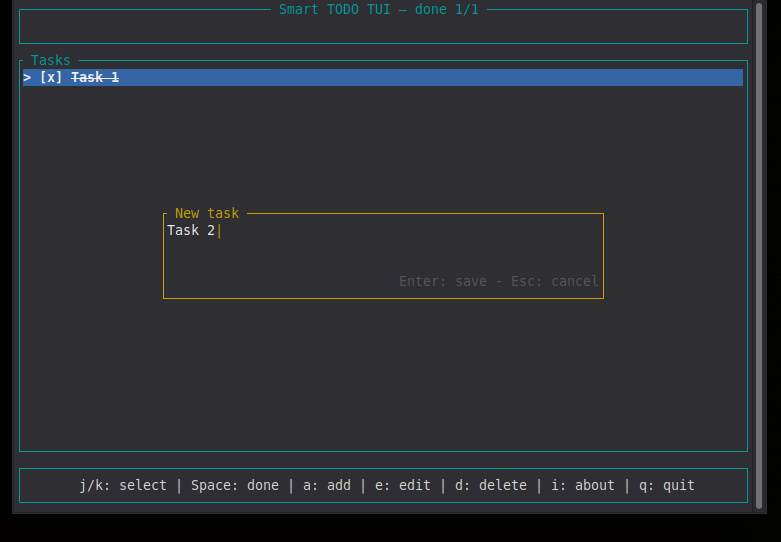
Features
- Full-screen terminal interface with borders, colors, and highlighted selection
- Add, edit, toggle, and delete tasks with single-key shortcuts
- Two-press delete confirmation to prevent accidental removal
- Modal input for adding and editing task titles
- Task titles limited to 200 characters, with a live counter in the input modal that turns yellow near the limit and red once it is reached
- Long titles truncated with an ellipsis in the list, input modal scrolls horizontally so the cursor is always visible
- About screen with version, author, license, and project links
- Automatic persistence to a JSON file after every change
- Cross-platform user data directory handling (Linux, macOS, Windows)
- No external dependencies at runtime, no network access
| Key | Action |
|---|---|
Up / k | Move selection up |
Down / j | Move selection down |
Space | Toggle done state of the selected task |
Enter | Toggle done state of the selected task |
a | Add a new task |
e | Edit the selected task |
d | Delete the selected task (press twice) |
i | Open the About screen |
q / Esc | Quit the application |
Ctrl+C | Quit immediately |
Inside the input modal
| Key | Action |
|---|---|
Enter | Save and close |
Esc | Cancel and close |
Backspace | Delete previous char |
Left | Move cursor left |
Right | Move cursor right |
Inside the About screen
| Key | Action |
|---|---|
Esc / q / i / Enter | Close |
smart-todo-app-tui --help
smart-todo-app-tui --version
With no arguments the application starts in interactive mode.
Tasks are stored as JSON. The file location depends on your operating system and follows the standard user data directory convention:
| Platform | Path |
|---|---|
| Linux | ~/.local/share/smart-todo-app-tui/todos.json |
| macOS | ~/Library/Application Support/com.smartlegionlab.smart-todo-app-tui/todos.json |
| Windows | %APPDATA%\smartlegionlab\smart-todo-app-tui\data\todos.json |
Format:
[
  {
    "title": "Write documentation",
    "done": false
  },
  {
    "title": "Ship version 0.1.3",
    "done": true
  }
]
The file is created automatically on first save. If it does not exist at startup, the application begins with an empty task list.
Task titles are limited to 200 characters. Longer titles are truncated on save, so the stored JSON never contains a title beyond that limit.
From crates.io
cargo install smart-todo-app-tui
Prebuilt binary (Linux, static musl)
Download from the Releases page:
chmod +x smart-todo-app-tui-<version>-linux-x86_64-musl
./smart-todo-app-tui-<version>-linux-x86_64-musl
Statically linked, runs on any modern Linux distribution without additional dependencies.
From source
Requires Rust 1.88 or newer (edition 2024).
git clone https://github.com/smartlegionlab/smart-todo-app-tui-rs.git
cd smart-todo-app-tui-rs
cargo build --release
./target/release/smart-todo-app-tui
Build and install to your home directory
cargo build --release
install -Dm755 target/release/smart-todo-app-tui ~/.local/bin/smart-todo-app-tui
Ensure ~/.local/bin is in your PATH, then run:
smart-todo-app-tui
One-command install
curl -fsSL https://raw.githubusercontent.com/smartlegionlab/smart-todo-app-tui-rs/master/install.sh | bash
Installs the binary to ~/.local/bin/ and registers the application in your desktop menu.
Uninstall
rm -f ~/.local/bin/smart-todo-app-tui
rm -rf ~/.local/share/smart-todo-app-tui
The second command removes your task file. Skip it if you want to keep your tasks.
smart-todo-app-tui-rs/
├── Cargo.toml
├── LICENSE
├── README.md
├── install.sh
├── uninstall.sh
└── src/
    ├── main.rs       Entry point, terminal setup, event loop, CLI parsing
    ├── app.rs        Application state, todo model, mode enum
    ├── events.rs     Keyboard event handling per mode
    ├── ui.rs         Rendering of header, list, footer, modals
    └── storage.rs    JSON persistence and user data directory
- Language: Rust 1.88+ (edition 2024)
- Terminal UI:
ratatui - Input:
crossterm - Storage: JSON in user data directory
- Platform: Linux / macOS / Windows
- License: BSD 3-Clause
By using this software, you agree to the full disclaimer terms.
Software provided "AS IS" without warranty. You assume all risks.
License: BSD 3-Clause License